GPT-6.1 Sol vs GPT-6 Luna: Pricing, Coding & Agents

By Olivia Hart
MyClaw Editorial
Compare in MyClaw
Compare GPT-6.1 Sol and GPT-6 Luna on your own work
Run the same task in both models to compare coding quality, tool use, speed, and cost before choosing your default.
AI Takeaway
- Which model should you choose for complex work? Start with GPT-6.1 Sol for demanding coding and tasks involving several tools. Keep it when better results justify the extra spend.
- When is Luna the better value? Choose GPT-6 Luna for focused, repetitive tasks that consistently pass your quality checks.
- How much cheaper is Luna? Standard uncached input and output cost one-twentieth as much. Cache reads cost one-tenth as much; the total bill depends on usage and retries.
- Can you simply switch model names? Check compatibility first. Sol 6.1 requires Responses for tool calling and does not support the
nonereasoning setting.
GPT-6.1 Sol vs GPT-6 Luna at a Glance
OpenAI positions GPT-6.1 Sol for complex coding, computer use, and professional work, while GPT-6 Luna prioritizes efficiency on focused tasks. The decision comes down to how much judgment a task requires, how often you run it, and what mistakes cost to fix.
| Factor | GPT-6.1 Sol | GPT-6 Luna |
|---|---|---|
| API model ID | gpt-6.1-sol | gpt-6-luna |
| Context window | 1,050,000 tokens | 1,050,000 tokens |
| Maximum output | 128,000 tokens | 128,000 tokens |
| Input / output | Text and images / text | Text and images / text |
| Standard input / 1M tokens | $2.00 | $0.10 |
| Standard cached input / 1M tokens | $0.10 | $0.01 |
| Standard cache writes / 1M tokens | $2.50 | $0.125 |
| Standard output / 1M tokens | $10.00 | $0.50 |
| Reasoning settings | low, medium, high, xhigh, max | none, low, medium, high, xhigh, max |
Prices are OpenAI's Standard API rates checked September 30, 2026, for requests with up to 272,000 input tokens. Higher rates apply above that threshold.
The earlier GPT-6 Sol vs Luna comparison covers a different model: gpt-6-sol. Sol 6.1 retains its $2/$10 input/output rates but halves the Standard cache-read price from $0.20 to $0.10 per million tokens. It also changes reasoning and tool compatibility, as explained below.
The shared context limit offers no automatic reason to choose Sol. What matters is whether the model can find and use the relevant information accurately.

Which Model Fits Your Work?
Choose Sol 6.1 for Work That Requires More Judgment
Sol 6.1 is the stronger starting candidate when an agent must make several dependent decisions: trace a bug through shared code, coordinate changes across files, or reconcile conflicting evidence in a research brief. This recommendation follows OpenAI's stated focus for the model; it is not a claim that we measured a coding win over Luna.
Consider a report that calculates totals incorrectly when a record is missing. A useful fix must explain the cause, handle the missing record, and preserve correct totals for ordinary inputs. Your coding-agent workflow should verify each requirement before accepting the change.
Sol earns its higher rate if it reduces meaningful errors, repeated attempts, or expensive review. A small formatting change with an obvious answer may offer little opportunity for that advantage. Choose according to the decisions involved in the task, rather than treating all coding work as equally difficult.
Choose Luna for Repeatable Work at Scale
Luna is a sensible default candidate for extracting invoice fields, categorizing support requests, and summarizing daily updates. These jobs become especially attractive at high volume, provided you can check their accuracy. Include incomplete invoices and ambiguous messages in the trial; a narrow task can still contain difficult cases.
For speed, measure the time until the work is usable. Generation speed, reasoning, tool execution, and corrections all contribute. A model that replies sooner may still finish later if it needs another attempt.
For a practical comparison, choose ten representative tasks and run each more than once with the same inputs, tools, and permissions. Track completion rate, elapsed time, and review minutes. Compare a shared reasoning setting first, then tune each model separately; identical effort labels do not guarantee identical token use.
Inspect failures before upgrading. Missing instructions need a clearer task definition. A persistent reasoning error is a better reason to try Sol.
What Will Each Model Actually Cost?
Standard Prices and the Cache Difference
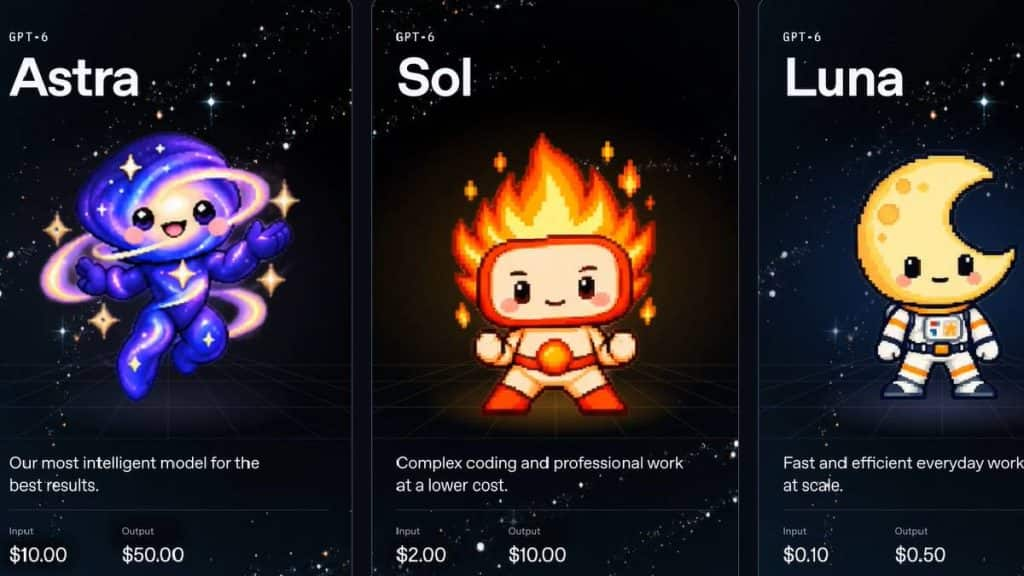
The table separates uncached input, cache reads, cache writes, and output because each contributes differently to the bill. Sol 6.1's cache discount narrows its price gap with Luna on reused input. It does not turn the entire request into a cache read: newly supplied material and generated output still incur their applicable charges.
Consider an illustrative request with 20,000 uncached input tokens and 2,000 total billed output tokens:
- Sol 6.1: $0.04 input + $0.02 output = $0.06.
- Luna: $0.002 input + $0.001 output = $0.003.
At 10,000 requests of exactly this size, the totals would be $600 and $30. These are illustrations using equal token counts and Standard rates, excluding tool fees and other premiums. Actual runs may use different amounts of tokens.
Reasoning tokens are billed as output, even when they are not visible in the answer. The example's 2,000 billed output tokens cover both reasoning and the visible answer. A 2,000-token visible answer plus additional reasoning would cost more.
Cost per Accepted Result
Add the API and tool charges for every attempt, then divide by the number of accepted results. Track review and repair minutes alongside that figure, or assign them a cost if you need one combined measure.
In the illustration above, Sol adds $0.057 per request. Saving review time could justify that difference on an individual job. Across thousands of routine tasks, however, Luna's savings become substantial if both models meet the same quality standard.
Also watch context growth. For both models, prompts above 272,000 input tokens trigger whole-request rates of twice the input/cache prices and 1.5 times the output price. Recheck processing-tier and regional modifiers when changing deployment settings.
Keep hosting in a separate budget line. MyClaw hosting plans cover the managed environment; the pricing page states that AI token usage is separate from the subscription. A provider's actual charges may also differ from OpenAI's list prices. Compare your expected invoice with the accepted work it buys.
Check Reasoning and Tool Compatibility Before Switching
Switching to Sol 6.1 can require more than changing the model ID.
GPT-6.1 Sol supports reasoning from low through max, with medium as the default. It does not accept none or minimal. A configuration that disables reasoning for Luna therefore needs adjustment before using Sol 6.1.
For tool calling, Sol 6.1 requires the Responses API. Its Chat Completions support is for requests without tools. Luna supports function calling through Chat Completions only with reasoning_effort: "none"; use Responses when combining reasoning and tools.
A successful text response does not verify an agent integration. Before switching a recurring workflow, verify the complete tool cycle: the model requests an action, the integration runs it, and the result returns to the model. Hosted services may manage this connection for you, but still need to support the exact model and settings.
The broader guide to choosing a model for OpenClaw can help you evaluate the surrounding setup. API prices also do not establish ChatGPT or Codex subscription allowances; check app access separately if that is where you plan to work.
Put Your Model Choice to Work with MyClaw
A model choice becomes more useful when attached to a repeatable workflow. MyClaw provides managed OpenClaw hosting, keeping your agent available while handling the hosting infrastructure.
1. Create an OpenClaw Workspace
Use managed OpenClaw hosting for a private, always-on agent. Start with a daily operations summary: provide a sample report, specify which figures must appear, and define what the agent should do when data is missing. Keep this task small enough to review quickly.
2. Confirm the Model and Run a Real Task
Check the model choices in your account or supported provider configuration. GPT-6.1 Sol availability in MyClaw remains unverified as of September 30, 2026, so confirm access before planning to use it there.
If both models are supported, run the sample in separate sessions with identical starting materials. Compare the figures and omissions in the finished report.
3. Keep the Setup That Meets Your Target
Set a quality target and spending limit before making the workflow routine. Use Luna while it meets that target; choose Sol 6.1 when its improvement on difficult cases is worth the additional cost.
Review the first several scheduled outputs. If the task changes, such as adding new data sources or requiring more judgment, reassess the model instead of assuming the original choice still fits.
Compare in MyClaw
Compare GPT-6.1 Sol and GPT-6 Luna on your own work
Run the same task in both models to compare coding quality, tool use, speed, and cost before choosing your default.