Seedance 2.5 Review (2026): 30s AI Video, Pricing & Fit

By Nathan Cole
MyClaw Editorial
MyClaw
Run Best-in-Class AI Agents Now
Run OpenClaw or Hermes Agent on managed MyClaw hosting, so your AI agent stays online, updated, and ready for real work.
AI Takeaway
- What is Seedance 2.5? ByteDance Seed’s audio-video joint generation model for up to 30-second storytelling with multimodal references, timestamp editing, and multi-round extension — not a standalone consumer app brand.
- How is it different from Seedance 2.0? 2.5 prioritizes longer single-pass clips (up to 30s), a larger reference budget (up to 30 images, 10 videos, and 10 audio), and finer edit/extend control; 2.0 stays stronger when you need 1080p or 4K on many official routes.
- What quality should you expect? Demos stress smoother motion, synced audio, multi-shot continuity, green-screen, and camera control; reviews still report morphing, voice drift, and prompt sensitivity — treat outputs as review material, not guaranteed finals.
- How does Seedance 2.5 pricing work? ModelArk bills by video tokens (resolution × duration); aggregators commonly derive about $0.10/s at 480p and about $0.23/s at 720p without video input — verify the live BytePlus, Jimeng, or reseller card. Apps bill credits, not identical dollars.
- Does MyClaw run Seedance 2.5? No. MyClaw runs private always-on OpenClaw and Hermes agents plus Chat image tools for briefs and stills — not Seedance 2.5 in Chat. Soft path: stage assets and optional user-configured API jobs beside Seedance.
What Seedance 2.5 Actually Is
Seedance 2.5 is a ByteDance Seed team model shipped through Jimeng AI, Doubao Pro, and related surfaces (July 2026 rollout), not a separate product you download under that name alone. International API access typically lands on BytePlus ModelArk under IDs such as dreamina-seedance-2-5-260628, with reseller gateway slugs like bytedance/seedance-2.5 — always match the model ID on the card you pay for.
The practical job is clip generation: one-take narrative beats, reference-heavy brand packs, and edit-or-extend loops. It is not live avatar streaming. For shorter conversational video routes, contrast Vidu S2. In the broader Chinese AI model wave, Seedance is a closed, managed video model — sibling to Seedream for images, not open weights you self-host.
Seedance 2.5 vs Seedance 2.0 in One Glance
| Dimension | Seedance 2.5 | Seedance 2.0 (context) |
|---|---|---|
| Single-pass length | Up to ~30s + multi-round extend | Typically up to ~15s |
| References | Up to 30 images / 10 videos / 10 audio | Smaller pack (often 9 / 3 / 3) |
| Editing | Timestamp-level; green screen; camera/perspective; extend | Editing/extension present but shorter window |
| Resolution (official-leaning) | Commonly 480p/720p; 1080p availability varies — verify | Broader high-res path including 4K on many cards |
| Access | Jimeng / Doubao Pro apps + ModelArk / resellers | Same family, different model ID |
MyClaw’s MiniMax H3 vs Seedance comparison covers Seedance 2.0. Use that page for 2.0-era tradeoffs, and keep version labels explicit when you evaluate 2.5. Mixing Seedance 2.0 and Seedance 2.5 clips in the same review folder is the fastest way to draw the wrong conclusion about resolution or length.
Capabilities That Matter for Real Shoots
Longer Single Passes and Multi-Round Extension
Seedance 2.5 targets up to about 30 seconds in one generation. Official materials also describe further extension rounds so multi-minute stories can carry character and scene continuity claims across appends. A useful test is one continuous 20–30 second beat sheet versus stitching three 10-second clips: if mid-shot continuity breaks first, try the longer pass before you spend time on seams.
Extension is not free quality. Each append inherits whatever identity drift or audio mismatch the prior clip already has, so lock a keeper mid-story before you stack rounds. Name files with model ID, pass number, and duration so later review can tell a first-pass 30s take from a patched extend.
Multimodal References (Images, Video, Audio)
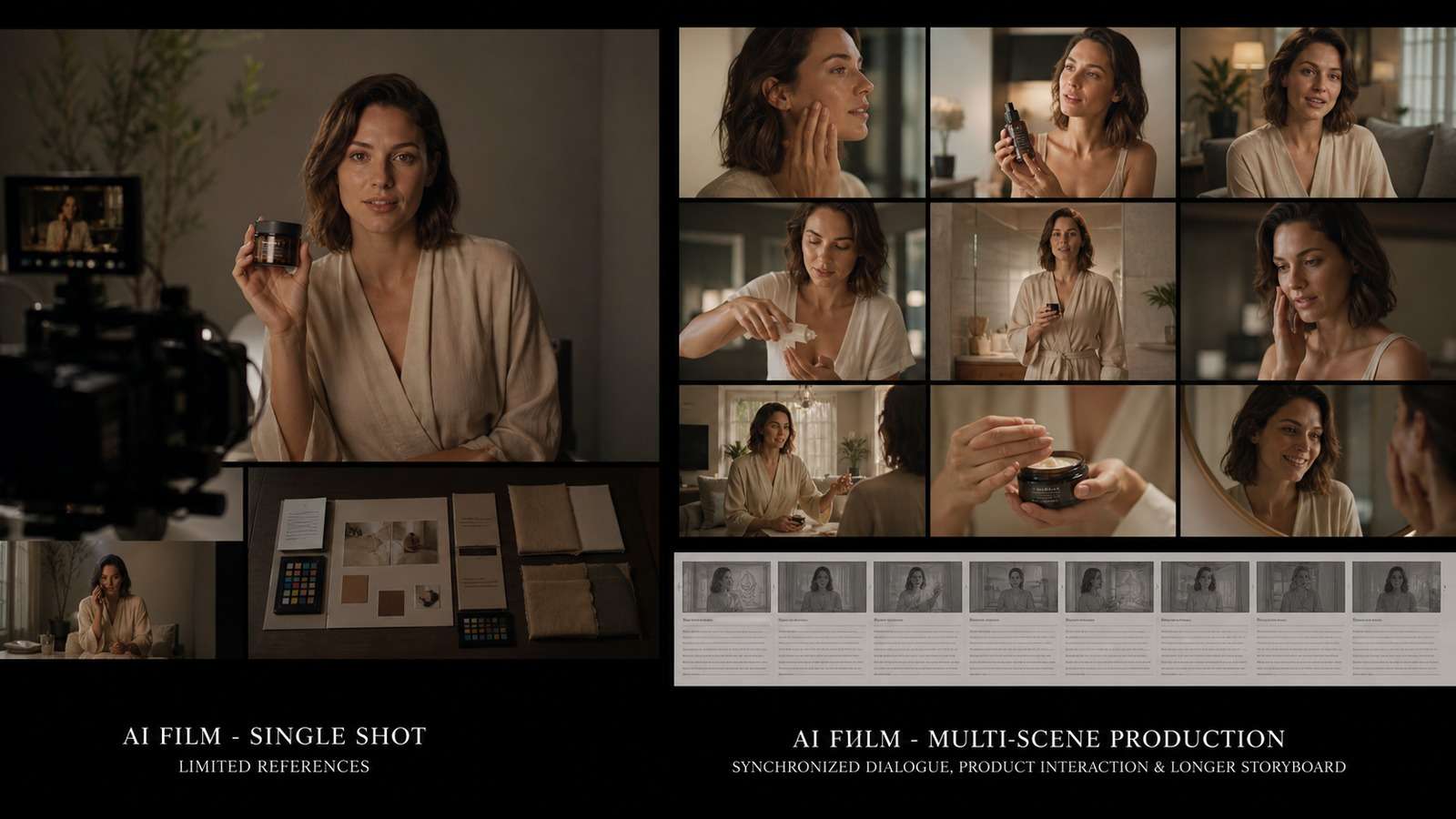
The typed budget is the real production upgrade: up to 30 images, 10 videos, and 10 audio clips, with audio-only reference called out in first-party docs for 2.5. Teams use clay-render or white-model spatial blocking, motion references, and creative packs beyond simple style transfer. Assign each asset a job — identity, camera path, or voice — before you generate, and drop unused references rather than flooding the pack.
When a subject fails to hold, cut competing identities first, then raise the primary still’s weight in the brief. Video references help motion; they also raise cost and can pull the cut toward the reference’s pacing, so treat them as intentional, not default.
Timestamp Editing, Green Screen, and Camera Control
Integer-second and timestamp direction during generation, plus targeted post edits, reduce full-clip rerolls when one mid-shot detail fails. Green-screen background replacement with claimed physics-aware subject response, first/last-frame control, and perspective edits matter for advertising and film-adjacent work. Write edit notes as time-coded instructions (“at 00:12 swap backdrop; keep subject edge”) so rerolls stay local.
For a shorter-clip conversational editor with different length and resolution tradeoffs, see Gemini Omni 1.1 Flash — adjacent tooling, not a Seedance substitute.
Quality Reality Check
Vendor demos and third-party reviews do not tell the same story. Judge both against your brief, not against a highlight reel.
Pros:
- Genuine ~30-second one-take window with native synced audio
- Large multimodal reference budget for multi-subject, multi-shot briefs
- Edit and extend paths that cut full-clip rerolls when a mid-shot detail fails
- App plus API surfaces for creators and production pipelines
Cons:
- Official routes often top out below 4K; high-res delivery still favors Seedance 2.0 on many cards
- Reviews cite morphing, decoherence on fast action, and unpredictable voice casting
- Higher per-second cost than 2.0 or mini tiers at matched resolution
- App access (Jimeng / Doubao) can be region- and account-friction heavy outside China
- Reseller “4K Seedance 2.5” marketing frequently mismatches official resolution tables — verify the model ID
The decision that usually matters is resolution versus length against Seedance 2.0, plus cost-per-accepted-clip math: generation spend and review labor divided by keepers, not raw dollars per second alone. Run the same brief once on Seedance 2.5 and once on Seedance 2.0 when delivery resolution is in doubt, and score both against the same acceptance checklist rather than against demo reels.
Seedance 2.5 Price, Credits, and Access
Do not treat any single dollar figure as a forever list price. BytePlus ModelArk bills by video tokens driven by resolution and duration. As a research snapshot — verify live before you budget — aggregators commonly derive about $0.10/s at 480p and about $0.23/s at 720p without video input (roughly $0.103/s and $0.231/s on some cards). Those figures move with token tables and promo periods, so treat them as orientation, not a locked quote. Video-reference jobs often bill lower per output token; audio is commonly included at the same rate. Confirm the live BytePlus, Jimeng, or reseller card on the day you buy.
Consumer Jimeng and Dreamina-style surfaces sell credit packs and plans. Convert credits into estimated clip cost; never paste reseller dollars as ByteDance list price. Access routes include Jimeng Web or Doubao Pro model pickers, BytePlus ModelArk async tasks, and third-party gateways with markup variance. Budget rule: cost per accepted clip equals (generation dollars plus review labor) divided by keepers.
MyClaw hosting and Chat billing is a separate invoice from Seedance tokens or credits. Use MyClaw pricing only when you are sizing an always-on agent workspace beside the render, not as a Seedance rate card.
Who Seedance 2.5 Fits — and Who Should Skip
Good fit: 15–30 second ads, story beats, reference-heavy brand packs, edit-and-extend work from existing footage, and teams comfortable with managed API or app access who can absorb a review pass before publish.
Weaker fit: Must-ship 4K masters on this model ID; fully local or open-weight generation; live interactive avatars; and lowest dollars-per-second draft loops where Seedance 2.0 mini/fast or another draft route is the better first spend.
MyClaw Chat caveat: Chat is the wrong place to “open Seedance.” It is the right place to draft scripts and build reference stills via the Chat image generator and related image tools, then send a clean pack into Jimeng, ModelArk, or your reseller.
Keep Seedance 2.5 Briefs and Assets Moving with MyClaw
MyClaw does not host or switch to Seedance 2.5 inside Chat. It runs private always-on OpenClaw and Hermes agents for the work around the render — briefs, reference packs, optional user-configured API calls, file naming, and delivery — while Seedance on Jimeng, ModelArk, or a reseller does the pixels. That split keeps agent workspace costs and Seedance token or credit spend on separate invoices.
Step 1: Lock a Timed Brief and Acceptance Scorecard
Define audience, duration, aspect ratio, resolution ceiling, reference roles, and success checks (identity, motion, audio sync, text or brand). Set a hard spend cap before the first render so the agent and the human agree on what “done” means.
Step 2: Stage Still Assets in Chat, Then Connect Only What You Need
Generate clean character and product stills in MyClaw AI Chat / Image Generator, then keep a consistent frame-review habit on Seedance outputs. If you need automation, add your Seedance or BytePlus key as an explicit tool on the agent — never assume a native Seedance skill exists in Chat.
Step 3: Review, Log Cost, and Deliver Keepers
Keep the agent online to store prompts, model IDs, token or credit burn, and keeper filenames while a human approves brand safety. Soft next step: start from Chat for briefs and stills, or managed hosting when the loop should run overnight — beside Seedance, not as a substitute.
Should You Use Seedance 2.5 Now?
Yes when length, references, and edit/extend matter more than maximum resolution. Prefer Seedance 2.0 — or another high-res route — when 1080p or 4K delivery is non-negotiable on the card you can actually buy. Run one real brief at 480p first, measure accepted-clip cost, then scale resolution or duration only after keepers justify the spend. Keep MyClaw for the always-on briefing and asset loop beside Seedance — not as an in-Chat Seedance switch.
Skip the Setup, Run Best-in-Class AI Agents Now
Launch a managed OpenClaw or Hermes Agent workspace in minutes, with always-on hosting, updates, and support handled by MyClaw.